

Making Requests
Requests are how your application fetches or updates data stored remotely.
What Does Remote Mean?
Usually remote refers to data that is stored on your server and accessed and updated via your backend API.
But it doesn't have to be! Remote really boils down to persistence - the ability for data to be reliably stored and retrieved again at a later time. LocalStorage, SessionStorage, IndexedDB and even the File System could each be considered a remote source of data for your application.


Reactive Control Flow
WarpDrive offers both a JavaScript API and a Component API for working with requests. Both APIs offer a clean way of working with asynchronous data via reactive values and states instead of needing to switch into imperative code or async/await. This approach enables automatic cleanup when components dismount, unlocking Intelligent Lifecycle Management
With the component API, any builder function can be used to produce the query the <Request /> component (Ember, React) should make.
import { Request } from '@warp-drive/ember';
import { findRecord } from '@warp-drive/utilities/json-api';
import { Spinner } from './spinner';

export default <template>
  <Request @query={{findRecord "user" @userId}}>
    <:content as |result|>
      Hello {{result.data.name}}!
    </:content>

    <:loading><Spinner /></:loading>

    <:error as |error state|>
      <div>
        <p>Error: {{error.message}}</p>
        <p><button onClick={{state.retry}}>Try Again?</button></p>
      </div>
    </:error>
  </Request>
</template>import { Request } from '@warp-drive/react';
import { findRecord } from '@warp-drive/utilities/json-api';
import { Spinner } from './spinner';
export function UserPreview($props) {
return <Request
query={findRecord('user', $props.userId)}
states={{
content: ({ result, features }) => (
<>Hello {{result.data.name}}!</>
),
loading: () => <Spinner />,
error: ({ error, features }) => (
<div>
<p>Error: {error.message}</p>
<p><button onClick={features.retry}>Try Again?</button></p>
</div>
),
}}
/>
}Coming Soon!Coming Soon!Request Options
WarpDrive uses the native Fetch interface for RequestInit as the foundation upon which requests are made. This ensures that if the platform supports it, WarpDrive exposes it: platform APIs are never hidden away.
WarpDrive RequestInfo extends RequestInit to provide additional capabilities for caching and fulfilling requests.
interface RequestInfo extends RequestInit {
  op?: string;
  store?: Store;

  cacheOptions?: {
    types?: string[];
    key?: string;
    reload?: boolean;
    backgroundReload?: boolean;
  };

  url: string;
  /**
   * data that a handler should convert into
   * the query (GET) or body (POST)
   */
  data?: Record<string, unknown>;
  /**
   * options specifically intended for handlers
   * to utilize to process the request
   */
  options?: Record<string, unknown>;
}
💡TIP
providing a signal is unnecessary as an AbortController is automatically provided if none is present.
Below are a few examples of making requests:
const { content } = await store.request({
  url: '/api/users'
});
Of course, writing requests so manually quickly gets repetitive.
WarpDrive offers two abstractions for helping to write organized, reusable requests.
- Builders - documented, reusable functions that produce a json request object, sometimes as simple as just a
{ url } - Handlers - middleware that enable enhancing, modifying, or responding to requests
Here's an example of how the requests above could be expressed as builders:
export function getUsers() {
  return {
    url: '/api/users'
  }
}import { getUsers } from '#/builders/get-users.ts';
const { content } = await store.request(getUsers());Together, an app's builders form an SDK for its API: named, documented functions that capture what each endpoint does and the business logic around it, that editors autocomplete, and that work the same in any framework. They are also the only way to give a request a typed response without a cast, and because a builder produces the same RequestKey every time, components can make the same request wherever they need the data and share one response instead of passing it down.
We build on this foundation to give access to a powerful pipeline for managing requests.
Requests Do Not Need To Use Fetch
The native Request interface provides a convenient, feature-rich way to describe the data you want to retrieve or update – but ultimately request handlers get to decide how that occurs.
Request handlers can be used to connect to any data source via any mechanism. Besides fetch, this might be localStorage, XMLHttpRequest, WebSockets, ServerEvents, MessageChannel, or something else entirely!
import { Store, RequestManager, Fetch } from '@warp-drive/core';
import {
  SessionSettingsHandler,
  FileSystemHandler
} from './app/handlers';

export default class AppStore extends Store {

  requestManager = new RequestManager()
    .use([
      SessionSettingsHandler,
      FileSystemHandler,
      Fetch
    ]);

}
Requests Aren't Just For APIs
Requests are a manner of expressing what data you want to use or an update to data you want to make.
The File System, browser managed storage mediums such as IndexedDB and localStorage, or WebAssembly builds of sqlite3 are all common examples of persistent or remote data sources that aren't accessed via connecting to a server.
The Chain of Responsibility
When we configured the RequestManager above, you may have noticed that when we gave it an array of handlers with which to respond to requests.
RequestManager follows the chain-of-responsibility pattern: each handler in our array may choose to respond to the request, modify it, or pass it along unchanged to the next handler in the array, in array order.
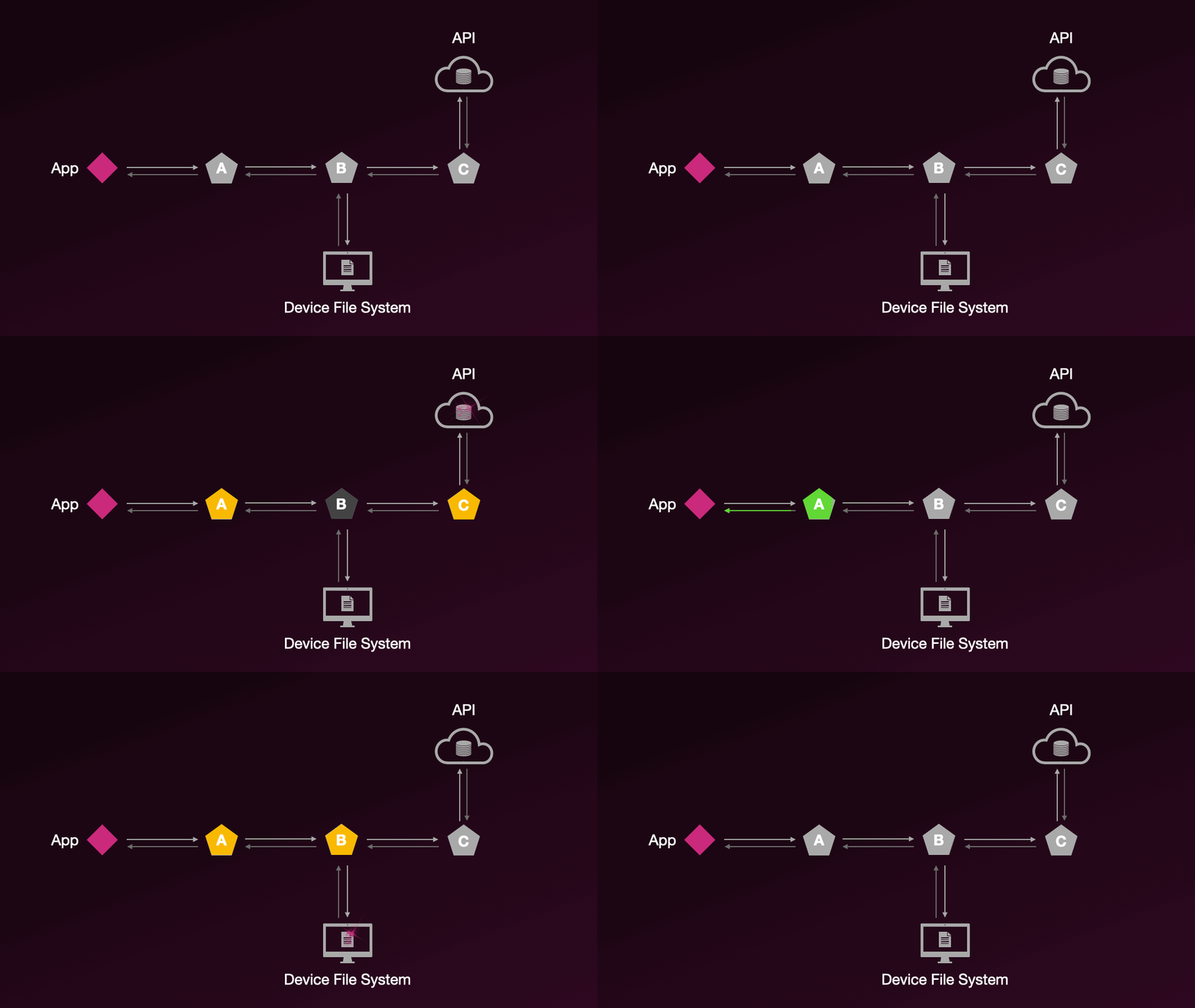
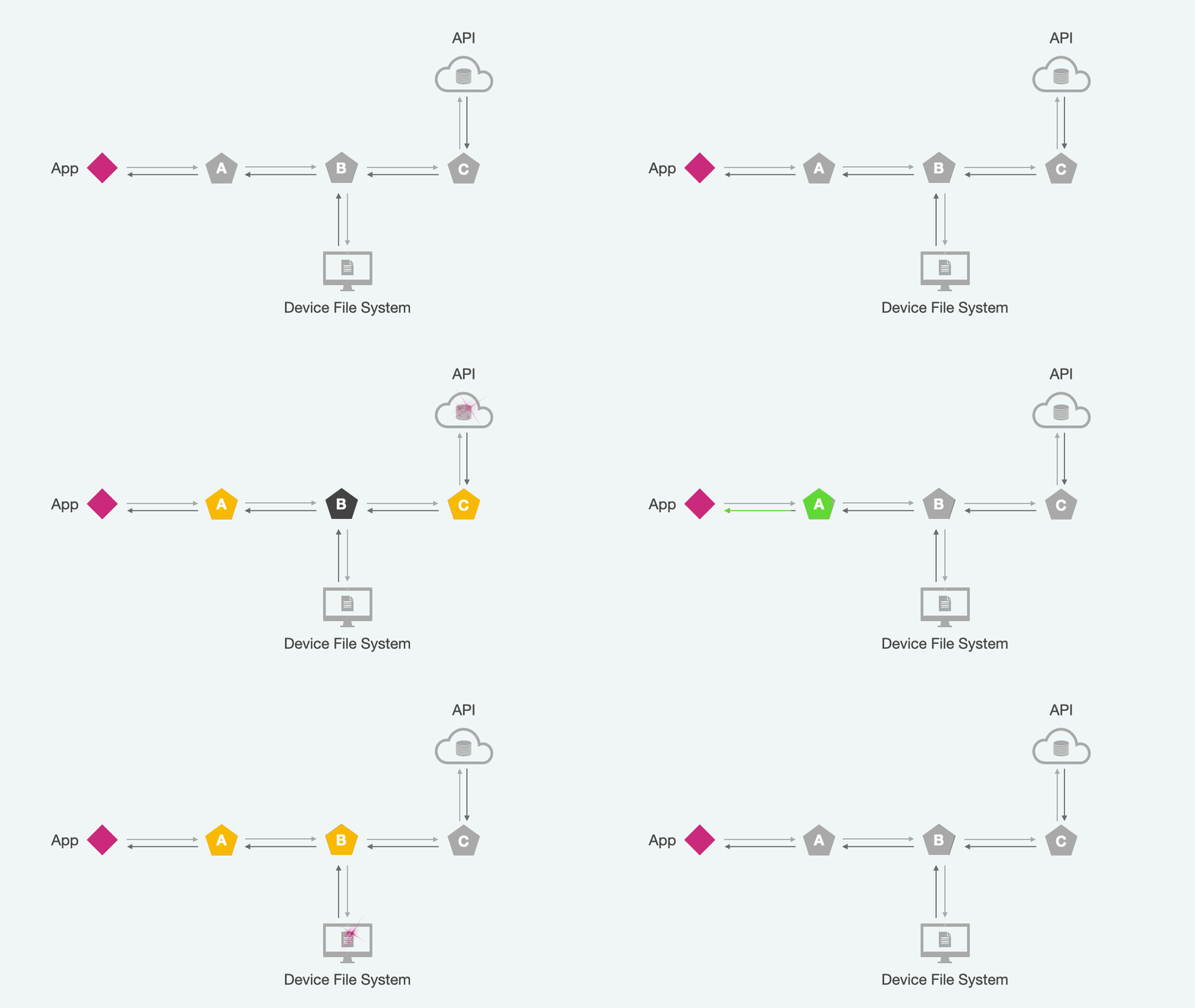
This architecture allows us to quickly integrate any kind of pre- or post- processing for requests to ensure we get the data we want how we want it.
WarpDrive comes with a number of useful composable handlers pre-built:
- Fetch - it makes
fetchhappen, and more - AutoCompress - automatically compress large request bodies and use streaming uploads where supported
- Gate - quickly activate/deactivate a handler per-request or more broadly
As well as a suite of useful utilities for handlers.
Paginated collections
A request that loads one page of a collection can drive a whole pager or infinite list. The experimental Pagination primitives and the Ember <Paginate /> component build on the requests described here. A builder for a paginated collection requests only the first page, and the rest are loaded by following the response's links; see Paginating With Links.